xpoint
The xpoint command enables you to adjust the values of the crosspoints in the panel’s audio mixer.
Display 2 displays the output audio stream.
Display 3 shows the input audio stream.
Display 4 shows the value of the crosspoint in dB. A value of -80 signifies no audio, and a value of 0 signifies all on.
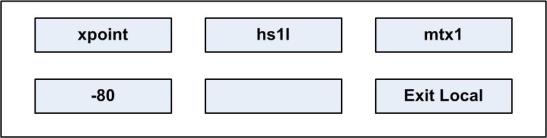
The output streams displayed in window 2 can be scrolled through using the up/down volume keys under display 2 (lever key and pushbutton panels).
On rotary panels use the rotary control and talk button to scroll through the output streams.
The output audio stream crosspoint options are:
| Crosspoint options | Description / comments |
|---|---|
| hs1l | Headset 1 left ear |
| hs1r | Headset 1 right ear |
| hs2l | Headset 2 left ear |
| hs2r | Headset 2 right ear |
| ls | Main loudspeaker |
| auxls | Auxiliary loudspeaker |
| mtx1 | Mono audio to the matrix via the analogue connection |
| mtx2 | Second channel of stereo to matrix |
| ext1 | External output 1 on auxiliary audio connector |
| ext2 | External output 2 on auxiliary audio connector |
| hotmic | Output to hot microphone on auxiliary audio connector |
| larec | Listen again output |
| voicerec | Message recording output |
The input audio stream crosspoint options are:
| Crosspoint options | Description / comments |
|---|---|
| mtx1 | Input mono audio from the matrix using the analog connection |
| mtx2 | Input a second channel of stereo from the matrix |
| ext1 | Input from external input 1 on the auxiliary audio connector |
| ext2 | Input from external input 2 on the auxiliary audio connector |
| hs1 | Input from headset 1 microphone |
| hs2 | Input from headset 2 microphone |
| tone | Test tone input |
| laplay | Listen again input |
| voiceplay | Message recording input |