REMOTE PNL menu
The REMOTE PNL menu enables you to program keys on a remote panel. Select the remote panel from a list of available panels using the Sort Groups.
| Note: | You can only use the REMOTE PNL menu to program keys on other V-Series panels. It cannot be used to program keys on other panel types. |
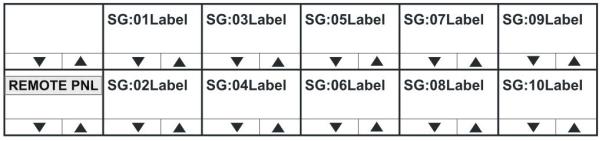
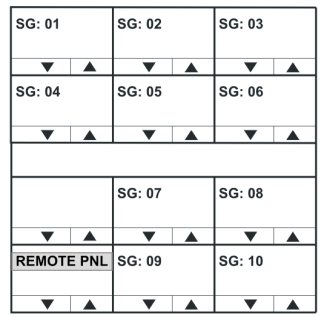
Use the up / down buttons (lever key and pushbutton panels) or rotary control on the Reply key to scroll through the list of available Sort Groups. To select a sort group from the list, use the pushbutton or lever key or talk button corresponding to the display window.
The Sort Group membership menu is displayed for the selected Sort Group.
| Note: | To return to the SYS CONFIG menu, press the Reply key (REMOTE PNL). |
| Note: | For information setting up Sort Groups, see the [link to Eclipse Configuration Menu]. |
The Sort Group menu options comprise the following:
| Menu option | Description / comments |
|---|---|
| Label | Label for currently displayed key in Sort Group. |
| Alias Label | Alias of currently displayed key. |
| START | Takes you to the start of the current Sort Group. |
| MIDDLE | Takes you to the middle of the current Sort Group. |
| END | Takes you to the end of the current Sort Group. |
| OK | Accepts the currently displayed item and you to the REMOTE PNL menu where the remote keys can be selected and the attributes of the selected remote keys set. |
The Reply key displays the label of the selected Sort Group. The top row shows the first member of the Sort Group.
Pressing and releasing the down button (lever key and pushbutton panels) or turning the rotary encoder anti-clockwise on the reply key will step down through the Sort Group (towards the end).
Pressing and releasing the Up button (lever key and pushbutton panels) or turning the rotary control clockwise on the Reply key will step up through the sort group (towards the start).
Pressing the Reply key or Reply key talk button will return you to the REMOTE PNL menu.
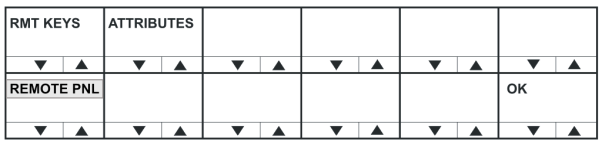
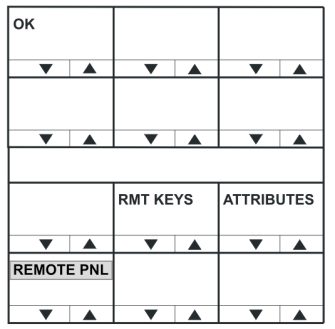
| Menu option | Description / comments |
|---|---|
| RMT KEYS | Press to assign keys on the remote panel |
| ATTRIBUTES | Press to set the properties of the remote panel keys. |
| Note: | To return to the Sort Group version of the menu, press the Reply key or Reply key talk button (REMOTE PNL). |
RMT KEYS menu
Use the REMOTE PNL > RMT KEYS menu to assign keys on the remote panel.
ATTRIBUTES menu
The REMOTE PNL > ATTRIBUTES menu allows the user to set the attributes of a panel key to TALK, LISTEN, TALK + LSTN, TALK + FL or DUAL T+L.
For definitions of the available attributes, see ATTRIBUTES menu.
| Note: | To return to the REMOTE PNL menu, press the Reply key or Reply key talk button (ATTRIBUTES). |