Iris panel rear connectors
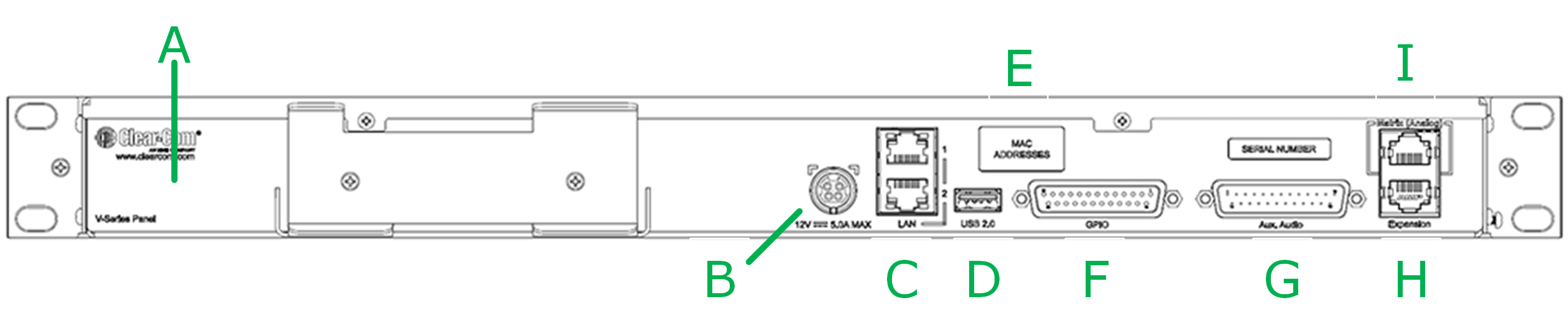
Iris rear panel connectors
| Item | Description of connector |
|---|---|
| A | Grounding screw |
| B | Sleeve locking power connector (12V, 60W). When connecting the sleeve-locking power connector, be sure to push until the sleeve locks into the device. |
| C | LAN 1 and LAN 2 (RJ45). Use either connector (not both) and do not connect more than one IP port to your network at the same time. This may lead to a broadcast storm and could seriously degrade the performance of your network. * |
| D | Micro USB connector, used for upgrades. |
| E | mDNS and MAC addresses (2). It is helpful to make a note of the mDNS number as this can be used to reach the device IP address if for any reason you cannot reach the panel on your network. |
| F | GPIO connector (DB25F) |
| G | Auxiliary audio connector (DB25M) |
| H | Expansion panel connector (RJ45) |
| I | Analog matrix connector (RJ45) |
For more information on how the rear LAN connectors work see Iris panel rear LAN connectors
| Note: | * From EHX v.13.0 and V-Series Iris v. 6.51 upwards, V-Series Iris LAN ports conduct link status monitoring. Due to this, daisy-chaining of panels is NOT supported from these versions. See Link Status Monitoring in this manual. |