IVC connectivity
IVC connectivity
Overview
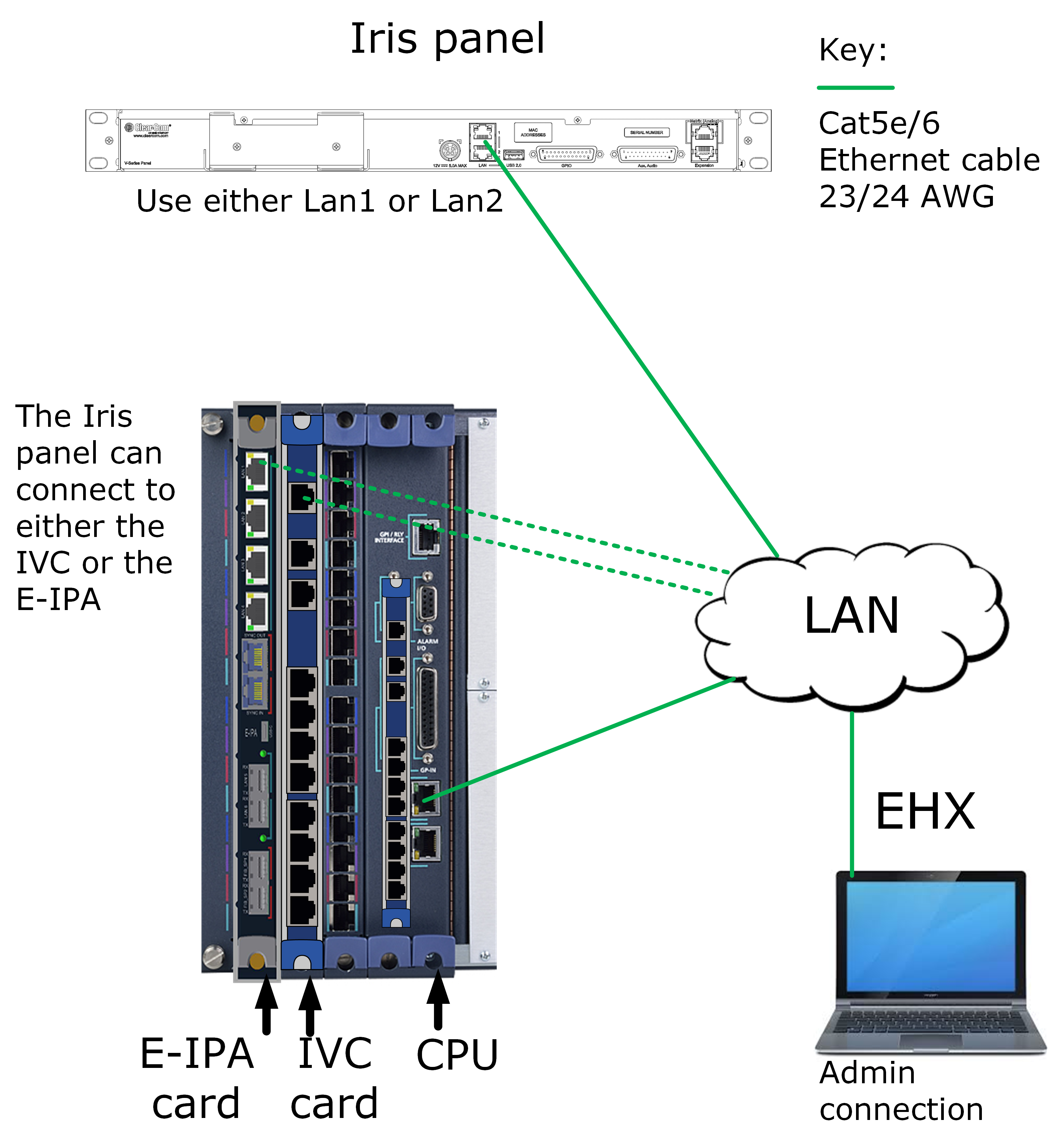
- Cable devices as shown
- Check the IP settings on your E-IPA card in the EHX software (navigate to Cards and Ports >E-IPA Card Properties). The default setting is to have Admin and IVC on LAN 1 (recommended). IVC IP settings must be set to Static (not DHCP).
- Configure the EHX software
- Select card; either E-IPA or IVC-32
- Add port
- Select panel type
- Select hosted directs if required
- Select connection method (IVC) from panel properties
- Initiate connection between the IP panel and the matrix. There are 2 possible connection methods:
- Using the Device Discovery feature. Device discovery will only work if the panels and matrix are on the same subnet. The Device Discovery feature will automatically populate both the panel and the EHX software with User ID and Password credentials.
- Manually enter the User ID and Password into both the panel and the EHX software. Use this method if you are connecting remote panels. See Accessing the IP configuration menus for more information.
- In both cases, you must Apply Map to Matrix to start the connection process.
- Monitor the connection process in the Iris panel screens or EHX Monitoring. Also check the Event Log as necessary.