FL CONFIG (Forced Listen configuration) menu
The Forced Listen configuration menu (FL CONFIG on the Reply key) enables you to select a key and set the source or destination of that key to forced listen.
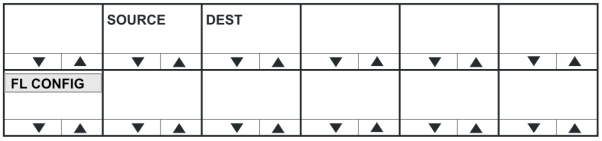
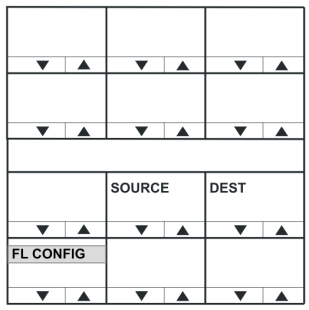
| Menu option | Description / comments |
|---|---|
| SOURCE | Press to select forced listen sources (FL SOURCE menu). |
| DEST | Press to select forced listen destinations (FL DEST menu). |
To return to the SYS CONFIG menu, press the Reply key or Reply key talk button (FL CONFIG).
FL SOURCE configuration menu
Selecting FL CONFIG > SOURCE takes you to the FL SOURCE menu.
Configuring a forced listen source creates a forced listen from the selected source to the selected key on the panel being configured. This results in the configured panel always receiving the audio from the forced listen source on that key.
To return to the FL CONFIG menu, press the Reply key or Reply key talk button (FL SOURCE).
In the FL SOURCE menu, select INTERFACES or PANELS to display a list of interfaces or panels that may be forced listen sources.
Press the volume up/down buttons (lever key and pushbutton panels) or turn the rotary control on the Reply key (FL SRC INT (Interfaces) or FL SRC PN (Panels)) to scroll through the list of possible interfaces / panels.
Press a key or talk button for a source interface / panel to select the label, and display the forced listen destination (FL DEST) menu.
FL DEST configuration menu
Selecting FL CONFIG > DEST takes you to the FL DEST menu. FL DEST is also displayed when you have selected a forced listen source.
Configuring a forced listen destination creates a forced listen from the panel being configured to the selected destination. This results in the configured panel always sending audio to the forced listen destination.
To return to the FL CONFIG menu, press the Reply key or Reply key talk button (FL SOURCE).
In the FL DEST menu, select INTERFACES or PANELS to display a list of interfaces or panels that may be forced listen destinations.
Press the volume up/down buttons (lever key and pushbutton panels) or turn the rotary control on the Reply key (FL DST INT (Interfaces) or FL DST PN (Panels)) to scroll through the list of possible interfaces / panels.
Press a key or talk button for a source interface / panel to select the label / destination, and display the forced listen source (FL SOURCE) menu.