Program Agent-IC to LQ connectivity
From the CCM, use the following steps:
- Set up Agent-IC users in the Accounts page of the CCM. Navigate to the Accounts page.
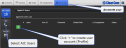
- Create user account # 1. Click image to enlarge/minimize
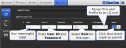
- Create user account #2. Click image to enlarge/minimize


Your Agent-IC user profiles are now setup and the client device can chose a Profile and connect to the system.
Connect Agent-IC to LQ
- From your phone or tablet, select an Agent-IC user profile from the 4 available. In this case you need to select an LQ profile, as LQ is the host device.
- Click the Settings button.
- Enter login credentials (User ID and Password). Click image to enlarge/minimize

- Enter the LQ IP address.
- Press the round Start button to connect.

Related topics