Network
Dynamic host control protocol (DHCP) or Static IP address allocation?
Default setting: DHCP
It is recommended that the Link-Master in a Link-Group has a static IP address.
Most networks use DHCP to allocate IP addresses. Because of this, DHCP is recommended for fast set-up as the devices can be immediately connected to any network that provides DHCP. The addresses provided are dynamic and may change from time to time. Because DHCP IP addresses can change, the Link-Master should have a static IP address, or it may lose connectivity to the group. Link-Local Environments
External IP address and External Port setting
For efficient networking, these details should be set for any LQ device that connects over a firewall.
| Note: | The Link-Master uses TCP port 80 for management, and TCP/UDP port 655 for audio. See Linking over Internet or WAN below for port addressing and port forwarding details. |
See your network administrator if you require network details.
Network Security
For an overview and more detail on HTTPS and security certificates, see Secure HyperText Transfer Protocol (HTTPs).
When you enable HTTPS, you must use an authentication certificate. You have a choice of three authentication certificates to use.
-
Clear-Com self-signed certificate (default)
-
EasyDNS certificate
-
A Fullchain certificate of your own choosing
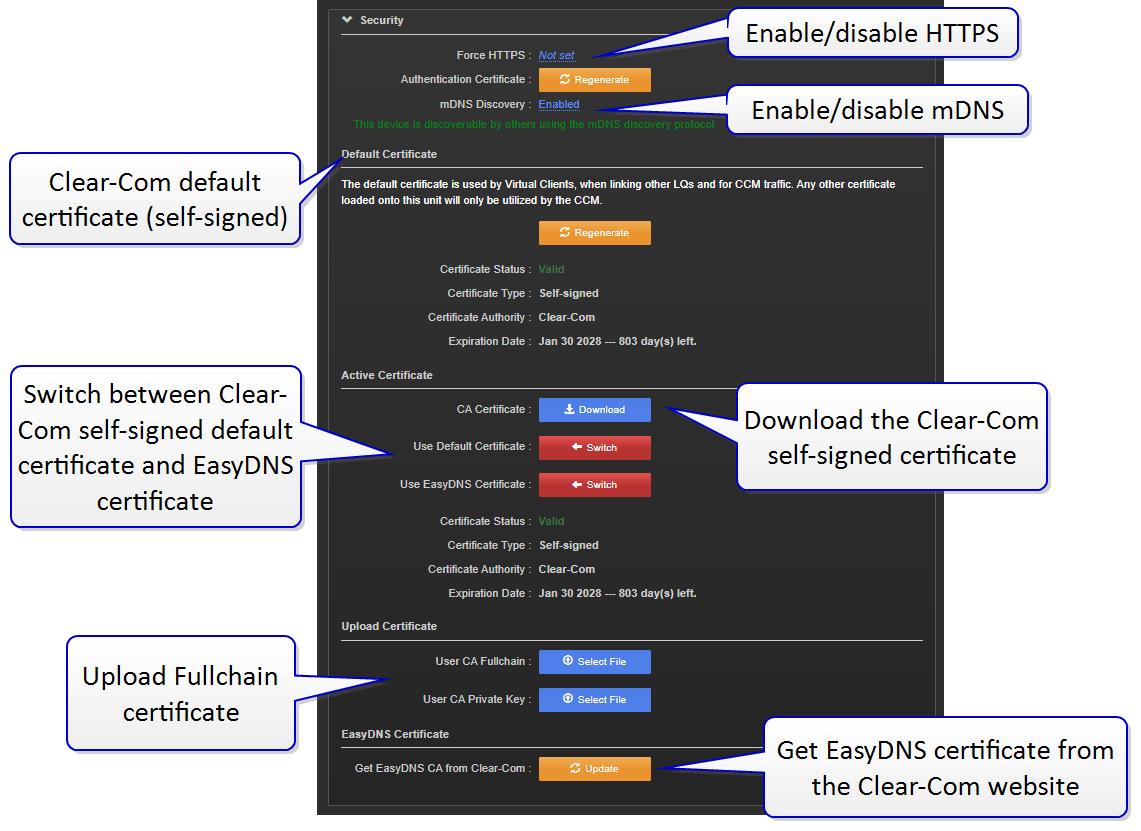
If the EasyDNS certificate has expired, use the Update button to automatically get the latest one from our website, otherwise use the Regenerate buttons to update other certificates.