E-IPA-HX Front Lens Indicators
|
|
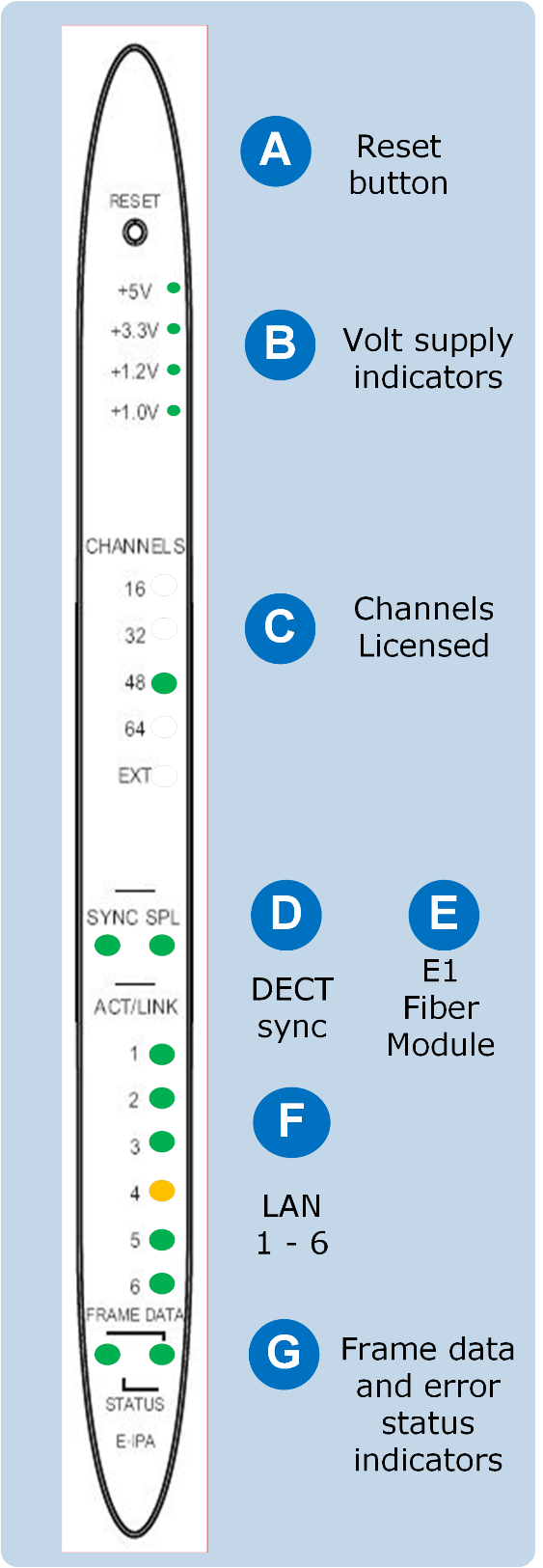
Reset button This button is recessed to avoid accidental reset. Use a paperclip, or some appropriate item to reset the matrix. |
|---|---|
|
|
Volt supply indicators Normally, all these lights are lit, showing that the correct voltage is being supplied to the various card components. |
|
|
Channels licensed This indicates how many channels are licensed to the card. EXT is for future use. |
|
|
DECT sync This LED lights when a DECT-in sync connection is fitted to the card. |
|
|
E1 fiber connection to FSII splitter When lit, this shows a connection to an FSII splitter (for future use). |
|
|
LAN ports 1 – 6 1 – 4 RJ45 LAN connections 5 – 6 Fiber LAN connections These lights show active links. They flicker and flash to indicate network traffic. An amber LED indicates 100Mbps connection. An LED lit green indicates 1Gbps connection. For FS II, Clear-Com does not recommend using less than 1Gbps in most circumstances, as 100Mbps only supports a small number of channels. A fiber connection is always 1Gbps and is always green. |
|
|
Frame data The Active (matrix data) LED flashes green at 1Hz to indicate communication between the E-IPA-HX card and the CPU card. This LED flashes twice as fast while a card is being upgraded and firmware is being installed. Status light Error LED Possible error conditions:
To diagnose other errors, see the EHX software event log. |


