E-QUE Front Panel Lights and Controls
|
Key to E-QUE front panel lights and controls |
|
|---|---|
|
Feature |
Description |
|
|
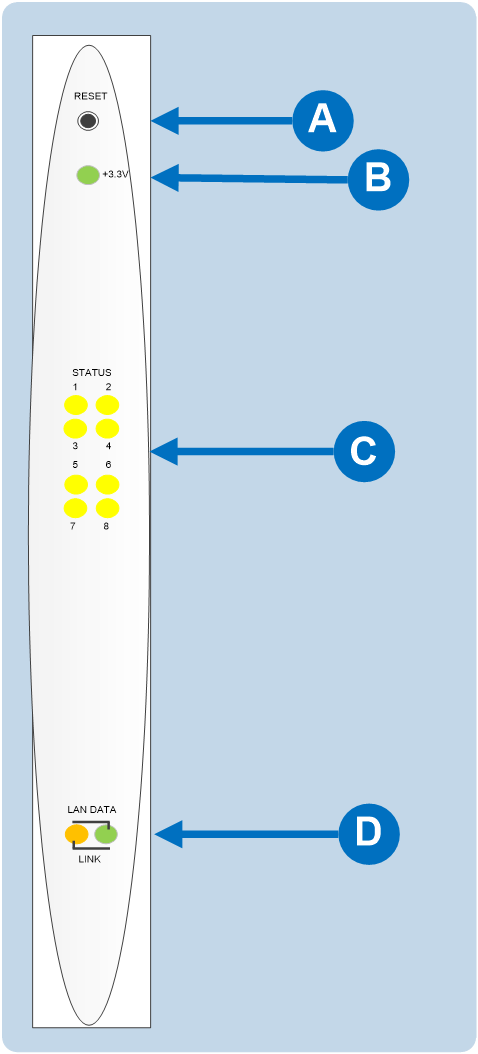
RESET button Pressing the reset button causes the card and all links to momentarily stop their current activity and to restart. During the reset, configuration information downloads to the card from the CPU card. If the entire system is operating except for one E-QUE card press the reset button for that card only. Tip: The reset button is slightly recessed from the front panel to prevent it from being accidentally pressed. A tool such as a bent paper clip is required to press this button. |
|
|
Power supply lights +3.3-Volt Power Supply Light The matrix’s +3.3-volt power supply provides electric current to this green light. When lit, the light indicates that the +3.3-volt supply is present and supplying power to the card. |
|
|
Status lights When lit, a status light indicates successful communication between the Each of the E-QUE card’s 8 yellow status lights corresponds to one of 8 ports to which devices can be connected. |
|
|
LAN DATA light The green LAN DATA light illuminates to indicate there is data passing through the Ethernet port. LAN LINK light The amber LAN LINK light illuminates to indicate a connection to the LAN port. |


