E-IPA-HX Rear Connectors
|
|
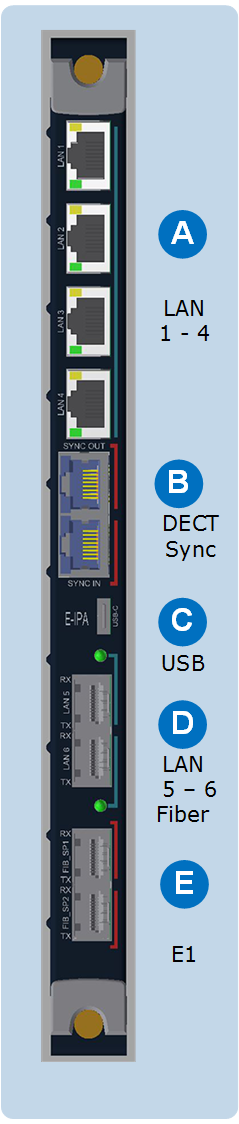
RJ45 LAN ports 1 – 4 These can be used for: Clear-Com panels, directs, trunks, LQ, Agent-IC. They can also be used for FSII IP Transceivers. One of the ports can be designated as an ADMIN port and used for maintenance. The functionality of these ports is configured in the EHX software. Although there are 6 LAN ports on this card, only 3 IP addresses can be configured. |
|---|---|
|
|
RJ45 DECT sync ports These connectors can be used when you are using two separate DECT systems in the same area. Connecting the systems with the DECT sync connector ensures that all connected clocks are synchronized together. This avoids clashes when many DECT devices are in use in the same RF space. DECT sync can be established between matrices, bases and third party systems. See DECT Sync Pinouts in the FreeSpeak II User Guides. |
|
|
USB C USB maintenance port. |
|
|
LAN ports 5 and 6. Fiber, AES67 only As with ports 1 – 4, the functionality of these ports is configured in the EHX software. They are designed to be used in AES67 networks for FSII IP transceivers. Although there are 6 LAN ports on this card, only 3 IP addresses are available. Use this slot to install an SFP/Mini-GBIC. |
|
|
E1 Fiber portsUse these ports to connect IP transceivers when the card has been configured to E1 mode. Install fiber modules according to existing network (single or multi-mode fiber): Part numbers:
|


| Note: | The E-IPA card has four Media Access Control (MAC) addresses. These are printed on the card. |