Configure SIP ports
 Create ports
In EHX, navigate to: Matrix > Cards and Ports:
-
Select the E-IPA card (blue highlight when selected)
-
Click the red + button to add a port
-
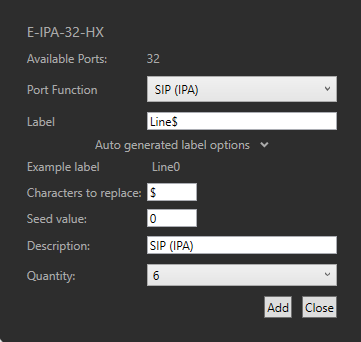
From the Port Function dropdown, select port type SIP (IPA)
-
Add a Label. If creating more than one port, use the auto-generated label options
-
Use the Quantity dropdown to select how many ports (SIP lines) you need
-
Click ADD to create ports
This example creates 6 SIP ports; Line0 - Line5.
Link SIP to ports
-
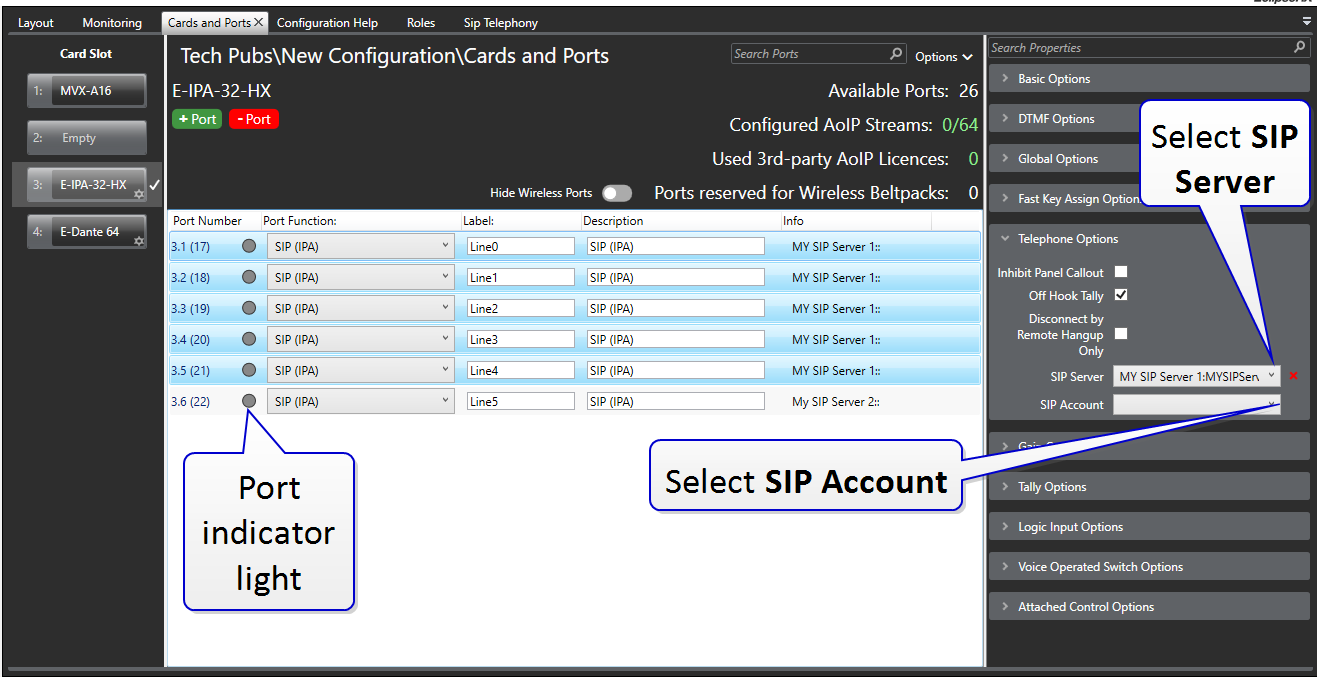
In Matrix > Cards and Ports, select the E-IPA card and select a port.
-
In Telephone Options, use the dropdown to select the SIP Server
-
For each port, allocate a SIP Account
| Note: | The shift key can be used to select several SIP (IPA) ports and the SIP Server field can be set for all selected ports. However, the SIP Account details still need to be added on a per port basis. |
Apply Map to Matrix when done.
You will see the port indicator lights turn blue (internal connection) and then green (ports are connected to the SIP Server).
When the SIP ports have been set up in SIP Telephony and Cards and Ports, the SIP lines can be assigned to a panel in the usual way in Panel Programming.