Role Options
In EHX, navigate to: Matrix > Configuration > Roles [select role] >Role Options.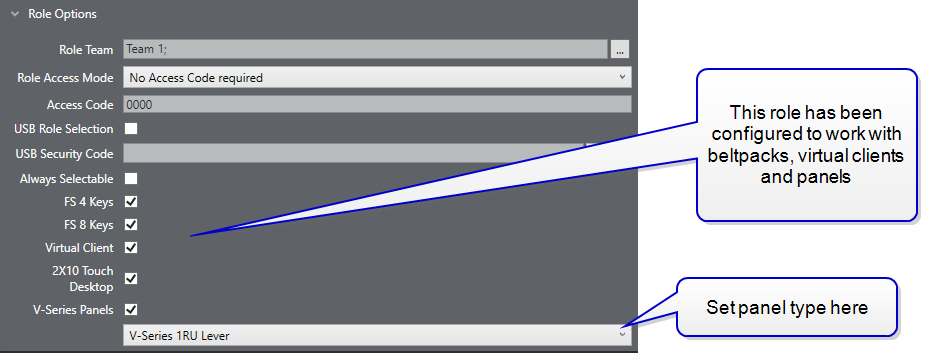
-
Role Team
Select Role Team if required. Role teams are used to organise multiple roles into teams so the person selecting a role on a panel does not have to scroll through multiple options. Click the three dots on the left of the option to add or delete role teams
-
Role Access Mode
Set Role Access Mode. The access mode determines whether an access code is required to start a role session
-
No Access Code required
-
Requires Access Code
-
Access Code when in use - the access code is necessary to select a role session while it is already in use on another device
-
-
Set Access Code. To start a session on a device that has been configured with access security, this access code must be entered on the panel
-
USB Role Selection. Enabling this option means a role session can be started/ended by inserting/removing a USB stick on the panel. See Role Based Panels - USB Role Selection
-
USB Security Code. This option becomes active when USB Role Selection is enabled. Click the write button to load the security code on to a USB stick. Once you have done this, inserting the USB with the access code into a panel will immediately start the role session. Remove the USB to end the session.
The access code on the USB must match the code in the EHX software.
-
Always Selectable. Enable this checkbox to allow you to select a role session while it is in-use on another device. See Role Based Sessions - Priority and Security
-
Enable endpoints; the devices that can use this role (FreeSpeak beltpack, Virtual Client, panel). Select or deselect any or all of these options. Panels and virtual clients must have a hardware port enabled for role based sessions before they can be used with roles.
-
Select Panel Type. Roles can be transferred between panel types. However, when doing this, be aware that EHX will perform a best-effort auto mapping of keys. Sometimes, for instance when applying role key layouts to dissimilar panels, this will result in some keys being hidden or out of place.