Global Options
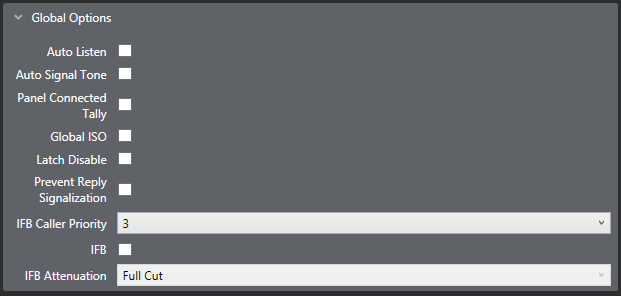
The following Global options are available:
Auto listen
This function enables a port for auto-listen. When a panel activates a talk to a destination that is configured for auto-listen, a listen path from that destination back to the source panel is also activated automatically for the duration of the call. In this way, the source receives audio from the destination without the destination having to specifically activate a talk back to the source. It is generally used on interfaces and four-wires.
The default setting depends on the port type.
| Note: | For Auto Listen to work correctly on external four-wire ports the MVX-A16 port must have the destination TX/RX data pins looped together. |
Auto signal tone (auto call signal)
This function enables a panel or interface port for automatic call signaling. If a talk path is activated to a destination that has been configured for auto-call signaling, the call signal is sent to the destination for the duration of the talk. Auto-call signals are most commonly used with external devices that require a control signal to activate them.
If a port set for auto-call signaling joins a partyline, or is preset to a partyline, an auto-call is not sent to the port if the talk is to the partyline.
The default setting is disabled.
For panels which support Auto Signal - Call Signal must be enabled.
Panel connected tally
This allows the system to set a tally (flashing LED) on a panel indicating that the corresponding panel is connected to the system. The default is disabled.
This is normally used on remotely connected panels where the panel to matrix communications may suffer from an occasional loss of service.
Not available for CCI-22, AES Mono, Panel Aux and Direct (no keys).
Global ISO
This function enables a panel or interface as a global ISO (Isolate) destination.
Any panel activating a talk to a global ISO destination creates a private, two-way talk path between that panel and the destination.
All other communications are interrupted by any call from any Panel or Interface in the Eclipse HX System. When the source terminates the call, its audio paths return to their previous state. When all ISO paths to the destination are deactivated, the destinations’ audio paths return to their previous states. For ISO talks to also interrupt listens at the source, select the ISO Interrupts All Other Listens check box in Configuration > Matrix Preferences. The default is disabled.
ISOs are always local to the matrix, so the source and destination must be devices on the same matrix. An ISO destination cannot be set to a remote matrix.
| Note: | If the destination of an ISO is a panel, then Eavesdropping must be enabled in Panel Options to activate the panel microphone if it is not already activated. If the destination is not a panel but a device such as a four-wire port Eavesdropping does not need to be enabled for the destination device. |
Hardware detection
This option enables the matrix to detect what kind of end device is connected to the port.
If you are using Optocore or BroaMan devices, ensure that this option is disabled.
Note: This option is only available for four-wire interfaces.
Global latch disable
This function prevents talk keys to the port latching. If a latch-disabled port is assigned to a talk key, the user can only talk to the port for as long as the operator physically holds down the key (PTT action). A latch-disabled port can be included in a fixed group or party line without automatically latch disabling the entire fixed group or party line.
The default setting is global latch enabled.
Mute listen with talk
This option mutes incoming audio when the Talk key is pressed.
Note: This option is only available for interfaces and 4-wire directs.
Partyline turnaround
Any other ports that talk or listen to the port are automatically enrolled in a hidden partyline. This means that any other port that can listen to this port can hear every port that talks to this port.
Prevent reply signalization
Prevents key signalization for the port appearing on the reply key of any panels.
IF caller priority
Allows you to assign an IFB priority when the port is used as an IFB caller. Priorities range from 1 (lowest) to 5 (highest). The default is 3.
| Note: | When a port is added to an IFB as a source to the IFB, the routing will be applied at priority 1 regardless of the setting in the field. |
IFB
Select this box to make the port an IFB destination. To configure the IFB source, use the IFB screen (Configuration > IFBs) or the Local Advanced screen (Configuration >Local Advanced).
If you select the IFB box, the following screen appears:
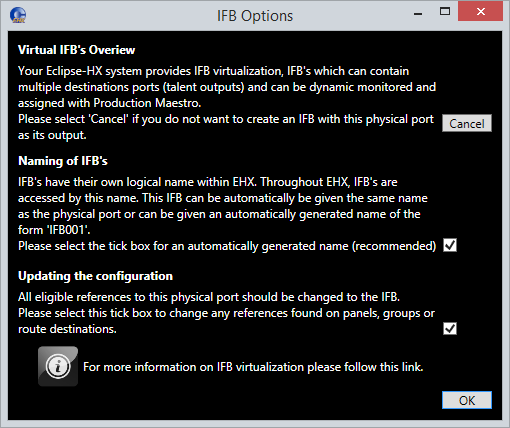
You can:
-
Choose to have an automatically generated name for the IFB (recommended).
-
Change all references to the physical port to refer to the IFB.