Logic Input Options
These options apply only to V-Series and I-Station panels.
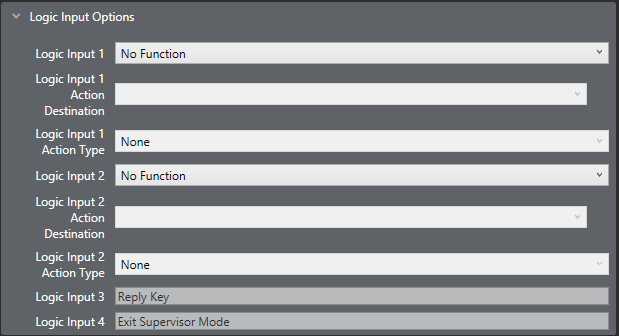
The Logic Inputs are used with GPI connections on panels that are fitted with local option cards, and with V-Series panels.
The logic inputs are also associated with PTT function on headset 1 and headset 2 on V-Series panels where the headset is either an XLR-7 type headset connected to the front panel or a headset connected to the auxiliary audio connector. In the case of V-Series panels, headset 1 PTT 1 or headset 2 PTT 1 active has the same effect as Logic 1 active. Headset 1 PTT 2 or headset 2 PTT 2 active has the same effect as Logic 2 active.
The PTT actions for XLR-4 and XLR-5 headsets connected to a V-Series panel are determined by the Headset PTT Function setting. You can find this setting at Hardware > Cards and Ports > Panel Options.
The following actions are available for both Logic Input 1 and Logic Input 2:
-
No Function
-
Mic On/Off
-
Mute Mic Output to Matrix
-
Mic Off (Momentary)
-
Activate Reply Key, then Clear Label
-
Studio Announce
-
Speaker Off
-
Activate All Pre-Selected Talk Keys*
-
Activate Talk Switch 1
-
Activate Talk Switch 2
-
Listen Mode/Again
-
Activate All Pre-Selected Two-Way Radio Talk Keys
-
Activate Configured Action
The default setting is No Function.
| Note: | Logic Inputs 3 and 4 are only available on V-Series Panels. Logic inputs 3 is pre-assigned to Reply Key. Logic input 4 is not currently used. |
* When using Panel GPIs, Logic 3 (reply key) will not operate as expected when combined with the PTT used to 'activate all pre-selected talk keys'. The reply key from the GPI acts as a latched talk, so requires the PTT action to allow the reply route to open.