Tally Options
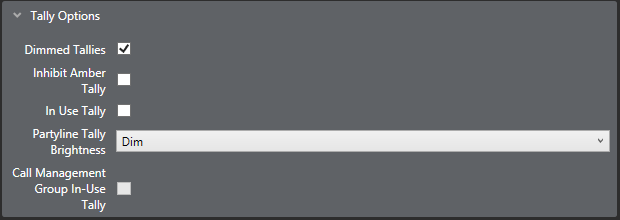
The following Tally options are available:
Dimmed tallies
Enables dimmed Tally lights (the default is enabled). When enabled, keys will always show a dimmed state of the active state.
Note: Only available on V-Series Panels.
Inhibit amber tally
When enabled, prevents the tally light for Talk and Listen keys on V-Series panels from being lit amber. The tally light is only lit red.
Note: Only available on V-Series Panels.
In use tally
This allows the system to set a tally (flashing LED) on a panel key indicating that the port is currently in conversation with another panel or interface. The default is disabled.
Partyline Tally Brightness
Sets the brightness level for Partyline In Use Tallies on that panel. This can be set either dim or bright. The default value is dim.
Note: Only available on V-Series Panels.
Call Management Group In-Use Tally
Uses green LEDS to indicate that other groups are in active group-to-group calls.
Note: Only available on V-Series Panels.
Receiver Active Tally
When a two-way radio interface port is assigned to a talk selector, the red LED will flash once per second when that radio’s receiver is active. This tally must be enabled from the configuration program.
Note: For FOR-22 only.