Entering Go Live Mode
-
Select System > Go Live to open a drop-down menu of Go Live mode options.
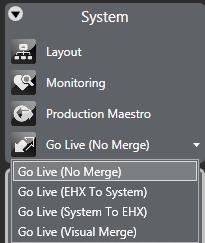
The live modes have the following effects:
-
Go Live (No Merge) - go live without merging the current EHX configuration with the current matrix configuration.
-
Go Live (EHX To System) - merge the current EHX configuration down to the matrix; the EHX configuration takes precedence.
-
Go Live (System To EHX) - merge the current matrix configuration up to EHX. The matrix configuration takes precedence.
-
Go Live (Visual Merge) - merge the configurations and offer the operator the option to decide which configuration takes precedence in the event of a conflict.
If the name of the configuration on the matrix is different to the configuration currently open in EHX, Live mode displays an error message.
The user may continue with the operation by clicking on the Yes button, but it is generally not advisable. If the user does continue with the operation further errors may be reported.
EHX then compares the matrix configuration with the current EHX configuration. If inconsistencies are found between the current configuration in EHX and the information from the matrix informatory messages are displayed.
EHX displays any differences between the current configuration open in EHX and the information from the matrix. For example, if a key is present on a panel in the EHX configuration but not in the matrix configuration then it be reported as a difference.
The same approach applies to forced and blocked listens.
Beltpacks and panels attached to the matrix that are offline or disconnected are not considered when EHX is checking for differences between the matrix configuration and the EHX configuration.
The user is given the following options if the configurations cannot be merged:
-
Upload On Matrix into EHX - overwrite the configuration in EHX with the current matrix configuration.
-
Download In EHX to matrix - overwrite the configuration in the matrix with the current EHX configuration.
-
Export - export the Go Live mode error report as a text file for analysis.
-
Cancel - Cancel the live operation and exit Go Live mode.
Some conditions can cause the live merge to report errors. The most common conditions are:
-
Panels present in the EHX configuration but not in the matrix configuration.
-
Panels present on the matrix but not in the EHX configuration.
-
Panels with locally assigned keys that are different to the keys set up in the EHX configuration.
In general merge errors arise when there are mismatches in the configuration through offline assignments in EHX or live assignments through a panel. The live error report that can be exported from EHX should be used to resolve conflicts if it is not desirable to overwrite either the EHX configuration or the matrix configuration.
If the matrix configuration appears to merge without errors being reported but there are apparent changes in areas such as panel programming the user should check whether the map in EHX has been imported but not applied before entering Go Live mode.
Once the configurations have been synchronized the background on the menu pane turns green and live editing of panel setups may be carried out. The Go Live button now displays Go Offline.