Diagnosing Jitter Problems: IVC Connections
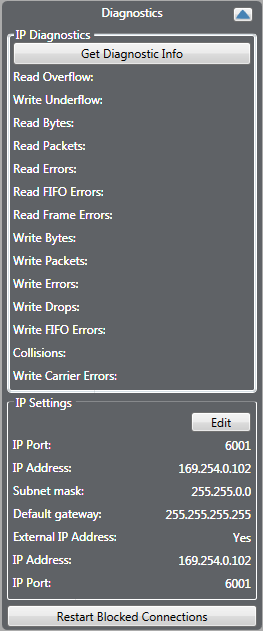
| Note: | Click on the Get Diagnostic Info button to retrieve the current buffer overflow statistics. If a significant number of buffer overflows are reported this may indicate network problems. |
Where data is presented for both panel and port this can be used to diagnose whether any network problems are at the matrix or panel end of the link.
Jitter is a measure of the quality of the network connection. It represents the variation in the time period with which audio packets are received. For example, if an audio packet is expected every 10 milliseconds, but one audio packet is received 13 milliseconds after another, this represents a jitter of 3 milliseconds.
If the jitter gets too high the panel starts to experience audio dropouts.
WAN mode panels can deal with larger jitter than LAN mode panels, and Internet higher than WAN mode, as they use larger jitter buffers to smooth out the uneven arrival of audio packets. However, the downside of this is that the larger the jitter buffer, the longer the audio delay.
-
Average Jitter - the average packet interval in microseconds.
-
Max Jitter - the highest packet interval measured in milliseconds.
-
LAN mode panels can cope with jitter up to 80 milliseconds without audio dropout.
-
WAN mode panels can cope with jitter up to 120 milliseconds without audio dropout.
-
Internet mode panels can cope with jitter up to 200 milliseconds without audio dropout.
-
Forward Error Correction - this allows the IVC-32 to recover from corruption in audio packets caused by a poor network link, at the cost of slightly increased network traffic and slightly higher audio delay. Forward Error Correction is set to a HIGH level in internet mode, LOW level in WAN mode and is disabled in LAN mode.
-
Silence Suppression - this reduces the network traffic generated by a panel by stopping the transmission of packets when there is no audio input (that is, the microphone is turned off). It can cause a slight increase in audio delay. Silence suppression is enabled in WAN and Internet mode but disabled in LAN mode.
-
Rx Packets - this displays a count of the IP packets that a panel has received and can be used to check the network connection. When Silence Suppression is enabled the numbers may only increase when the panel microphone is enabled.
-
Tx Packets - this display a count of the IP packets that a panel has sent and can be used to check the network connection. When Silence Suppression is enabled the numbers may only increase when the panel microphone is enabled.
-
Rx Drops - The number of audio packets that have been lost. This can be due to network quality.