Panel Options
Reply Tally Auto Clear Time
Use this option to set the period during which the Reply key will continue to flash after a call ends. Do this to make sure you do not miss a call. You can disable this feature, or select a period between from OFF to 60 seconds.
If you disable this feature, the Reply key will continue to flash after a call until you either
-
Answer the call
-
Press Cancel on the panel
This feature is available on panels, virtual clients, and beltpacks.
Brightness Level
Use this option to set the brightness level of the beltpack display. You can select the following:
-
1 to 5 – the display is brighter up to the highest level (5).
Display Dim Timer/Timeout
Use this option to determine when the beltpack display dims if no buttons are pressed or no calls are received. You can select the following:
-
Off – the display never dims
-
5 to 120 seconds
This option is available on panels and beltpacks.
Role based sessions:
If you are not working with the default setting (20 seconds) you need to set display dim timer for each device that uses the role configuration.
When using role based sessions, display dim timer can be set in both panel port properties and panel role properties. In this case, the role configuration is only applied when the panel role is active.
Display Off Timer
Use this option to determine when the beltpack display switches off if no buttons are pressed or no calls are received. You can select the following:
-
5 to 120 seconds after the Dim Timeout.
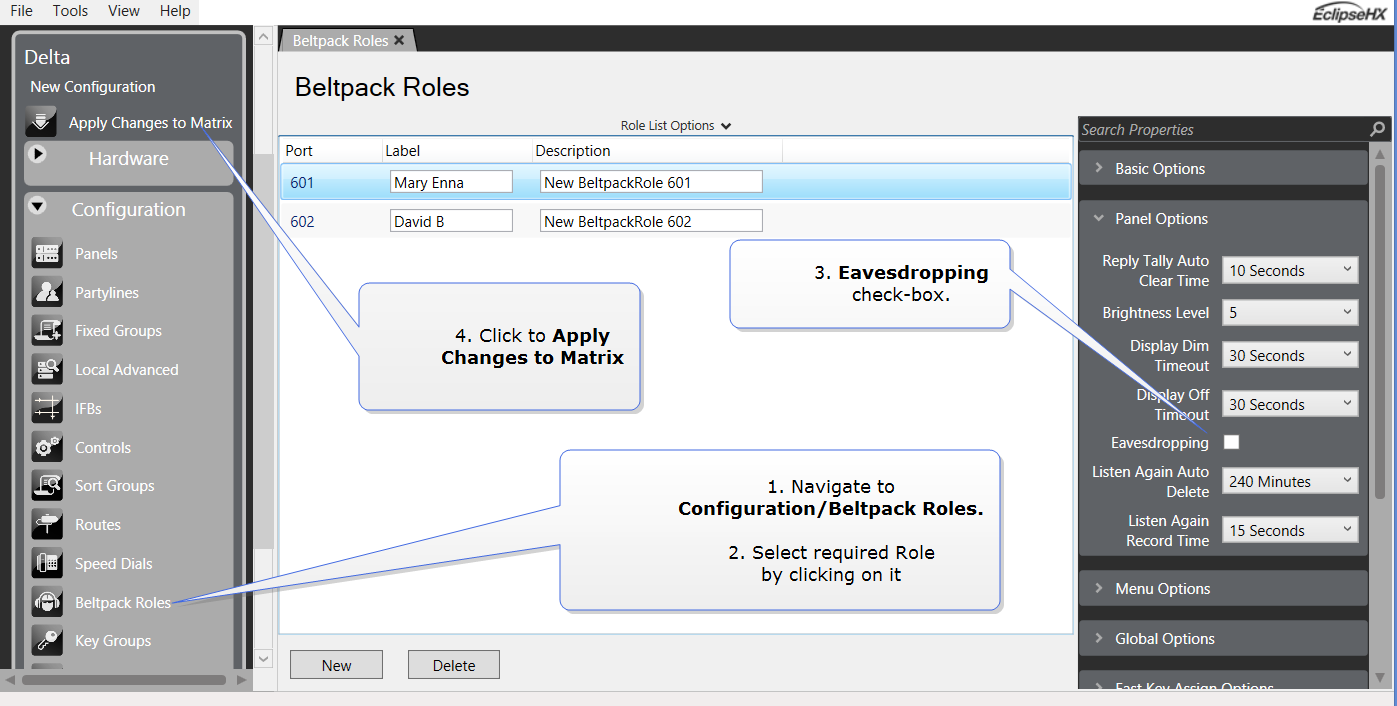
FS II configurable eavesdropping
Releases of FSII before 8.5.2 had the beltpack mic permanently open, meaning that audio coming from the beltpack could be listened to even if the user had no active talk routes. This feature can now be configured for each beltpack/Role in your wireless system. The default for FS II 8.5.2 and above is Eavesdropping disabled. However, earlier versions will revert to Eavesdropping enabled, the mic will remain open.
How to configure the eavesdropping feature
-
From the EHX software navigate to Configuration > Beltpack Roles > Beltpack Role > Panel Options > Eavesdropping.
-
If you tick the checkbox, the mic on the headset will remain open, even when the user has no talk routes active.
Listen Again Auto Delete
Use this option to determine when a Listen Again message is automatically deleted. Listen Again is a feature that allows you to replay an incoming message by tapping the beltpack Menu key. You can select the following:
-
Off – auto delete is disabled
-
30 to 240 minutes
Listen Again Record Time
Use this option to determine the length of Listen Again messages. Listen Again is a feature that allows you to replay an incoming message by tapping the beltpack Menu key. You can select the following:
-
Off – Listen Again is disabled
-
1 to 15 seconds
| Note: | If the message exceeds the record time, the message wraps round to the start of the buffer and overwrites any previously recorded material. |