Upgrading Beltpack and Antenna Firmware
You can upgrade the FreeSpeak II beltpack firmware by:
-
Using a USB connection
-
Using an Over The Air (OTA) upgrade.
You can upgrade the antenna firmware by:
-
Using a USB connection
-
Using central upgrade from the matrix to all connected antennas via the E-QUE card.
Upgrading FS-II beltpacks and antennas by USB connection
-
Connect the beltpack or antenna to a USB port on the computer running the EHX software.
-
Select Tools > Apply Wireless Firmware Via USB.
-
Browse to the location of the upgrade file, and then select Update Firmware.
The upgrade file is applied to the beltpack or antenna.
| Note: | You can connect more than one beltpack or antenna to the computer if you have multiple USB ports. The units will be upgraded sequentially |
Upgrading beltpack firmware by Over The Air Upgrade
-
Right-click on the Frame in the Layout window, and then select Firmware > Update Firmware. The Update Firmware Wizard appears.
-
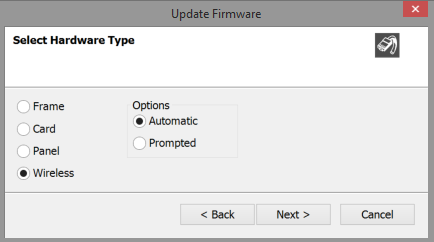
Select Next. The following screen appears:
-
Select the Wireless radio button. There are two further options:
-
Automatic – select this option to automatically upgrade the beltpack when it is switched on.
-
Prompted – select this option to allow the beltpack user to confirm the upgrade.
-
Select Next, and then browse to the upgrade file (.fww) and select Open. The upgrade file is loaded to the antenna. The upgrade file is applied to all the connected beltpacks, and the beltpacks automatically restart.
Note: The antennas store the beltpack upgrade files until they are power cycled or there is a black reset.
Note: You can track the status of the apply in the EHX Event Log, and for beltpack upgrades the upgrade status is also shown on the beltpack display.
Upgrading antenna firmware
-
Right-click on the Frame in the Layout window, and then select Firmware > Update Firmware. The Update Firmware Wizard appears.
-
Select Next. The following screen appears:
-
Select the Wireless radio button.
-
Select Next, and then browse to the upgrade file (.fww) and select Open. The upgrade file is loaded to the antenna, and the antenna restarts.
Note: You can track the status of the apply in the EHX Event Log.