Key Operation Preferences
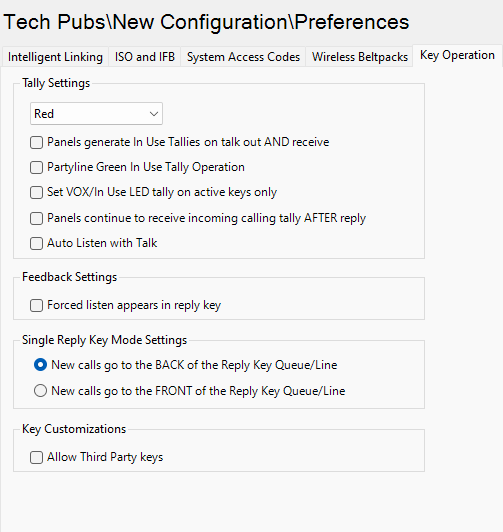
Tally Settings
Use this section to change the incoming Tally light color (the default is red). The options are:
-
Red. Tally light color is red
-
Green. Tally light color is green.
There are five check-boxes:
-
Panels generate In Use Tallies on talk out AND receive
-
Partyline keys use the green LED to signal In Use Tally whenever any form of listen operation is included on the key
-
Panels continue to receive incoming calling tally AFTER reply
-
Set VOX/In Use LED tally on active keys only
-
Pressing the talk key (regardless of latching mode) auto-latches the listen key. Removing the talk activation will not unlatch the listen key. The user can unlatch the key. Applies to :
-
V-Series, V-Series Iris, V-Series Iris X rotary and lever panels
-
Virtual Clients (Agent and Station-IC)
-
2X10 Touch Desktop panel
-
Feedback settings
If you select the Forced listen appears in reply key option, the label of any Forced Listen port appears in the Reply / Answerback stack of the listening panel. This can be over-ridden by each individual port’s option to Prevent Reply Signalization.
The option is unchecked by default.
Single Reply key mode settings
Use this section to determine the order in which incoming calls to a panel are stacked on the Reply Key.
-
If the New calls go to the BACK of the Reply Key Queue/Line option is selected then the calls are ordered on the basis of first in stays on top of the stack so the reply key answers the calls in the order they are received.
-
If the New calls go to the FRONT of the Reply Key Queue/Line option is selected, then the calls are ordered on the basis of last in goes to the top of the stack. This means that the Reply Key answers stacked calls by starting with the most recent call.
The default is that the first call is answered first.
Key customizations
You can allow third-party keys.
| Note: | When selected, special key entries that are configured on a panel key will be controlled by third-party applications (label displayed, key LED status and so on) and outside the control of the Eclipse HX system. |