Panel Programming Preferences
To configure the panel programming preferences, select Configuration > Preferences > Panel Operation.
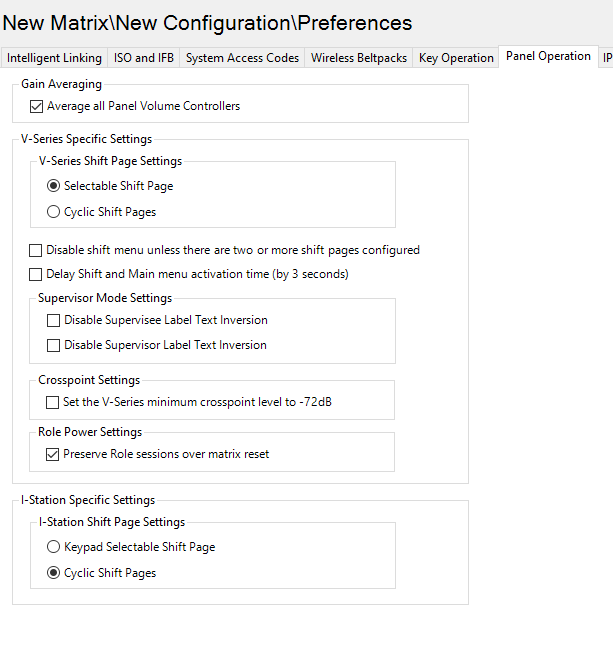
V-Series specific settings
This option enables you to determine how the V-Series panel shift button operates:
-
Selectable Shift Page – the shift button toggles between the Main page and the last selected shift page (short press) or displays a list of shift pages (long press).
-
Cyclic Shift Pages – the shift button cycles through consecutive shift pages (short press) or displays a list of shift pages (long press)
There are also check-boxes to:
-
Disable the shift menu unless two or more shift pages are configured.
-
Delay the shift and main menu activation time to three seconds.
-
Disable supervisor and supervisee label text inversion.
Crosspoint settings
By default, there is a default crosspoint level (-72dB) that can be set by a V-Series panel. This prevents panels from being able to completely mute audio. The tickbox allows the user to remove this limitation and achieve a full cut for crosspoint levels at the panel.
Role Power Settings (default: Enabled)
The default operation of the system is for logged in panel role sessions to persist across both a matrix reset and a map download. Options are provided auto logout all role sessions on either a map download or matrix reset.
Uncheck this option to log out role sessions when the matrix is reset.
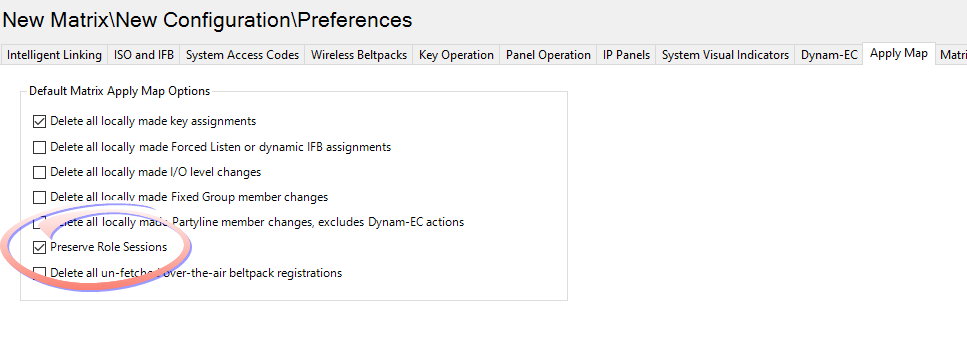
See Preferences > Apply Mapin the EHX configuration software for the option to log out role sessions when the map is applied to the matrix.
I-Station Specific Settings
These settings enable you to determine whether I-station shift pages are selectable from the keypad or cyclic.