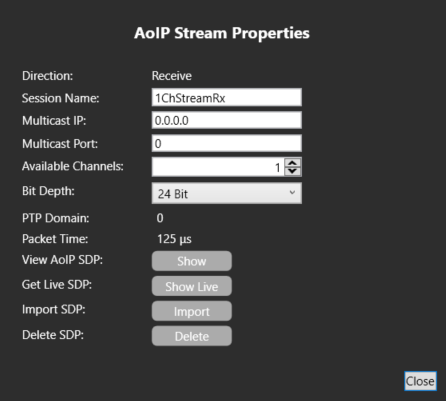
Example of an SMPTE 2110 Configuration
This
There are two types of port associated with AoIP Directs (AES67/SMPTE2110-30):
-
Direct (AoIP Stream)
-
Direct (AoIP Channel)
The difference between these two port types relates to the concept of a stream and a channel. In AoIP, a stream is the name for the audio data being sent from device A to device B. This is also known as a "Flow" in some manufacturer terminology (for example, Dante). Streams contain one or more channels.
Though a stream can contain only one channel, usually you will bundle multiple channels into one stream to achieve a higher efficiency in terms of network use and to maximize functionality.
The E-IPA-64-HX card has a capacity of 64 streams.
| Note: | This capacity is not dependent on any port license but might depend on the use of streams for a specific purpose. |
Streams can be used for:
-
FSII IPT
-
FS-Edge transceivers
-
IrisX Panels
-
AoIP Trunks
-
AoIP Directs
Each of these devices/port types uses one stream but may use up to eight channels (depending on configuration).
In this example, there are only Directs. The following table explains the difference between the two types of AoIP Direct:
|
Port Type |
Tx |
Rx |
|---|---|---|
|
Direct (AoIP Stream) |
Stream configuration and channel assignment |
Channel assignment |
|
Direct (AoIP Channel) |
Channel assignment |
Channel assignment |
The simplest case is the sending and receiving of a single channel stream to and from an IPA. In this case, you only need to use a Direct (AoIP Stream).
-
In EHX Cards and Ports, navigate to your IPA and click
 , and then select Direct (AoIP Stream):
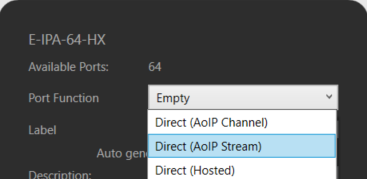
Here you can see:
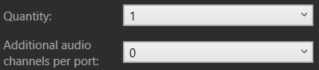
Which means there will be 1 Direct (AoIP Stream) port created with no addition channels.
This consumes:
-
1 stream from the 64 available on the IPA
-
1 port from the available ports (dependent on the port license of the IPA)
-
1 third-party AoIP license
The properties (to the right-hand side of the display) that distinguish this port from other Direct port types are the AoIP Device options. These are split into two sections: Tx and Rx (transmit and receive).
When the port is created, the following screen appears:
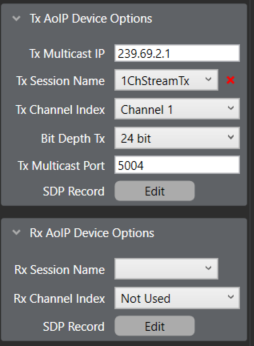
Because this port is a Stream, there is Tx stream configuration. This is the main difference between the two Direct (AoIP) port types.
There is a multicast address, which is automatically populated based on the multicast start address found in the IPA card properties:
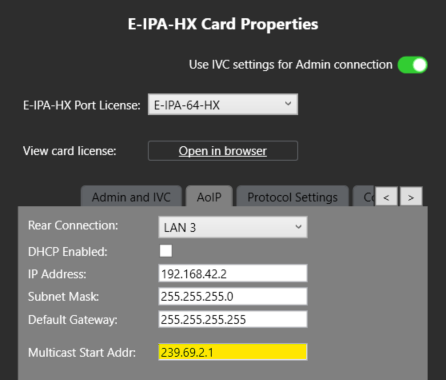
Because this is the first stream, the first address is assigned.
Next, there is a Tx Session Name:

This is automatically assigned the name of the port label but must be unique in your network. This is good practice but also essential to ensure correct functionality with all devices. This will be how you identify your stream in the configuration of your receiving device.
You can see that the stream contains only 1 channel:

You can see that the stream is 24 bit:

The Tx bit depth must match the Rx bit depth, and this should be assigned correctly before applying the map to avoid confusion. The default value is 24 bit but this can be set (per stream) to 16 or 32 bit.
The Tx Multicast (UDP) port is 5004:

This is also automatically populated, and each stream will have a unique port. This port can be changed (as well as the multicast address) but the defaults are there to help ensure a unique address. The combination of multicast address and port must be unique in your network.
So, in this example 239.69.2.1:5004 should only be used for this stream.
Using the SDP record Edit, you can manually adjust certain parameters:
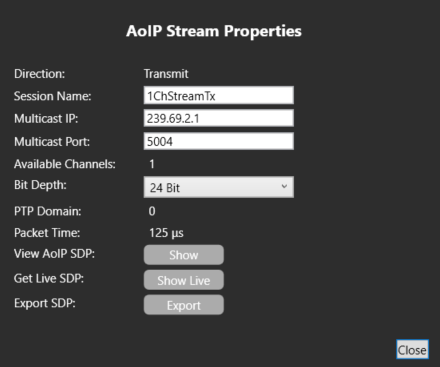
The available channels are fixed based on the port assignment. There is only 1 port (no additional channels) so only 1 channel.
The PTP Domain and packet time are set at the card level in the IPA Card properties.
You can also export a .txt file representation of our SDP file to use on a device without support for SAP (stream detection).
On the Rx side, the option is the same as would be seen in a Direct (AoIP Channel) port:
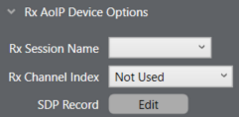
You can select a configured Rx Stream and pull a (single) channel from that to be assigned to the port. You can also input the information manually or import a .txt file using the SDP record Edit option here: