Add Ports (AoIP)
Add a Stream with up to 7 Additional Channels (Tx)
In the EHX software navigate to: Matrix > Hardware > Cards and Ports.
-
Click on the E-IPA card to select it.
-
Click the green +Port button.
-
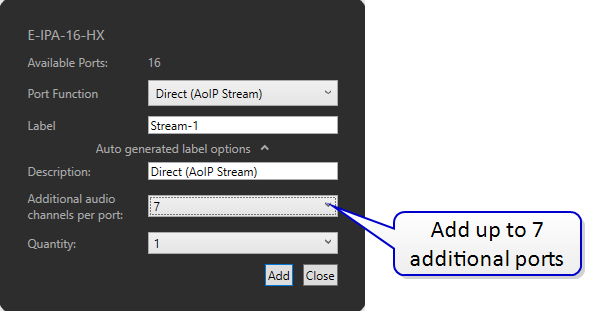
From the dropdown menu, select Direct (AoIP Stream).
-
Add a label.
-
Add as many additional channels as you require for this stream (up to 7, giving 8 channels in this stream)
-
Click Add, then Close.
-
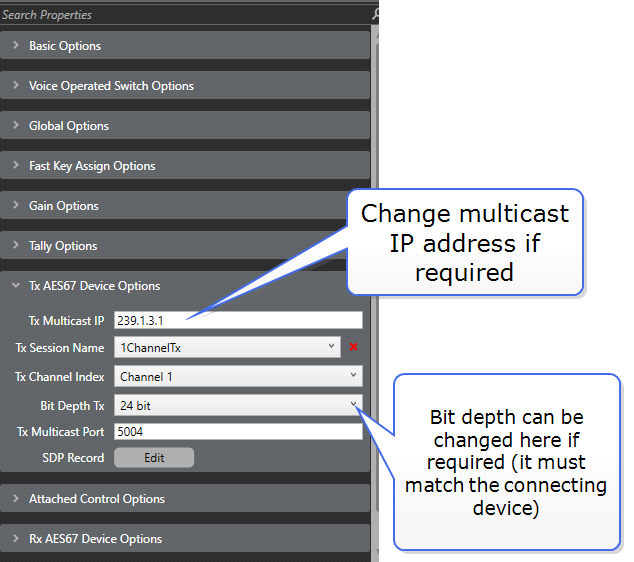
Click the port to select it (light blue highlight).
-
In port properties, go to Tx AES67 Device Options.
-
The system will automatically allocate a multicast IP address. You can change this now if needed.
-
Apply Map to Matrix (with a reset if you have not yet committed the PTP and AES67 properties of the card to the matrix).
-
Your card is now transmitting a single AES67stream with as many channels as you have configured.
The stream is now being broadcast onto the network and third party devices can be configured to receive it.