Routing AES67 across subnets
From EHX v.12.1 you can configure a gateway address on Clear-Com ST2110 devices to allow for the routing of multicast and unicast audio streams across subnets.
For some smaller systems it is simpler to implement AES67/ST2110 networks using a layer 2 topology, where all AES67 devices are in the same subnet or VLAN.
However, with the increase in remote productions and for large installations, there are times when you may need to have the devices placed across different subnets (using layer 3 routing).
Clear-Com devices that can be routed over layer 3 include:
-
E-IPA-HX card
-
V-Series IrisX panels
- FreeSpeak II for Eclipse-HX IP transceivers
-
FS-Edge transceivers
If you route Clear-Com devices over subnets, you will need:
-
a default gateway address on the E-IPA card.
-
the devices must also have static IP addresses
Example:
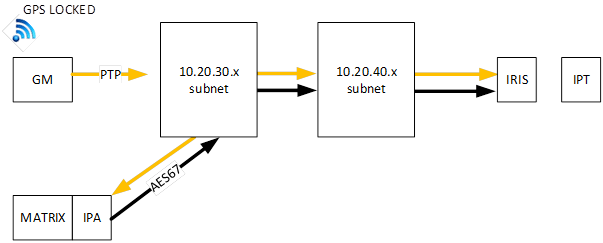
| Note: | There may be a pair of Primary Leader Clocks located at the main site for redundancy. Also, the network blocks are shown for simplicity but may contain several switches in the overall topology. |
To route either unicast or multicast audio across subnets you must configure your network correctly. Please consult your AES67 network IT expert or your Ethernet switch supplier for details on how to achieve this.
Clear-Com notes:
-
The same rules and network provision required to support Clear-Com equipment on a layer 2 network also apply to a routed layer 3 network. Please see: Clear-Com AoIP Network Recommendations, available from the Clear-Com website or visit the AoIP FAQ Solutions page for more information.
-
For IrisX panels
-
The overall packet travel time must not exceed 2 ms if using 125 µs packet time, or 20 ms if using 1 ms packet time
-
-
For IP transceivers
-
The overall offset from Leader Clock (OFM) must not exceed ±500 ns for reliable FreeSpeak beltpack handovers
-
Clear-Com IP transceivers (IPTs) have a higher than average timing accuracy requirement due to the need to sychnronize the devices in radio frequency (RF) space. Therefore, Clear-Com recommends the use of 125 µs packet time
-
The overall packet travel time must not exceed 2 ms if using 125 µs packet time, or 20 ms if using 1 ms packet time
-
General note:
The switch acting as the L3 router must also have the ARP proxying capabilities enabled. Otherwise, the AES67 packets might be routed incorrectly.
From EHX v.12.2.4 ARP proxying is no longer mandatory, ARP proxying may, or may not be used.
How to route IPTs and IP panels over Layer 3
Clear-com AES67 devices use mDNS for auto-discovery. If mDNS is not routed between subnets for auto-discovery, you will need to manually configure your system (IrisX panels/IPTs) using IP addresses rather than mDNS names.
-
Obtain a static IP address (with a valid gateway address) for your IP transceiver or panel.
-
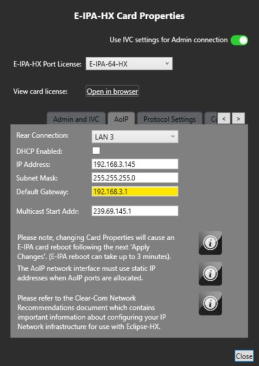
Make sure the default gateway is set on the E-IPA card for the AES67 network. Navigate to:(EHX > Matrix > Cards and Ports >E-IPA Card (right click on card) > Card Properties > select the AoIP tab)
-
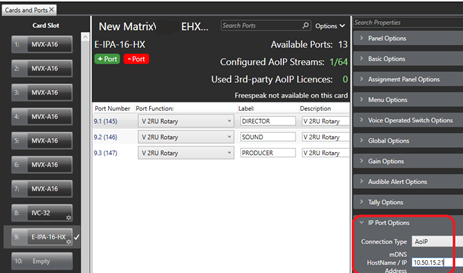
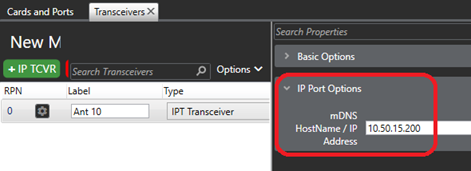
In the EHX map, configure the IP address for the IrisX panels/ IP transceiver ports. This tells the IPA card which endpoints it should try to connect to.
-
For each IrisX panel/IPT: open the device CCM (the browser-based configuration tool) and set its IP details, including the gateway setting.
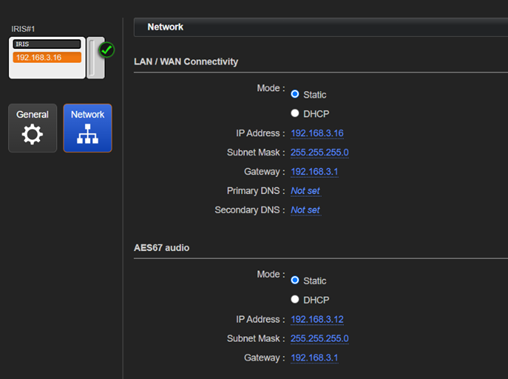
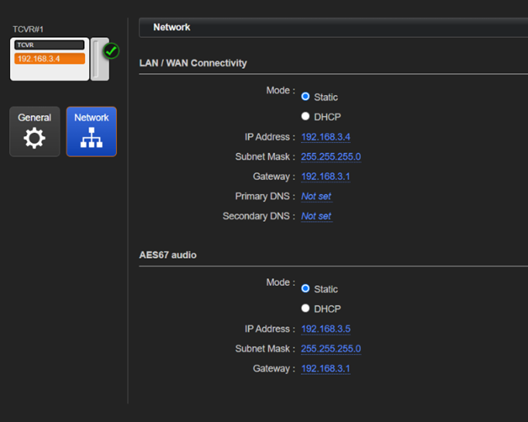
-
When done, in EHX, you must Apply Map to Matrix.
-
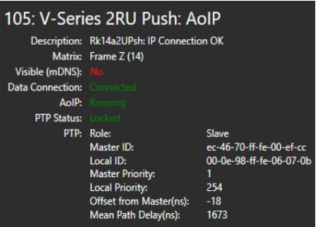
Connection details can be seen in the Monitoring page.
| Note: | The Visible (mDNS) detail in Monitoring will say No, if mDNS is not routed. |
| Note: | For more detail on how to configure an IP address for your IP transceivers and IrisX panels, please see the relevant manuals available from the Clear-com website. |