Configure the E-IPA card in E1 mode
FS-II E1 transceiver connection to an E-IPA card is available with EHX v.12.1 and above.
| Note: | Once configured in E1 mode, IP connections are no longer available on the card. |
| Note: | You must have 32 ports or above licensed on your E-IPA card in order to put the card into E1 mode. |
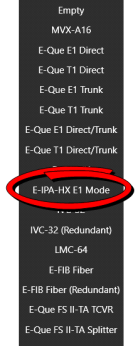
To configure the card in E1 mode you must set the card type to E-IPA-HX E1 Mode in Cards and Ports. When you have done this, the system will automatically create slots for 50 beltpacks and 10 FreeSpeak II transceivers in the configuration software and the system can be set up and configured as usual.
For how to cable the FS-II E1 transceivers see the Clear-Com matrix guides available from the Clear-Com website.
How to Configure the E-IPA-HX card in E1 Mode
-
In the EHX software, navigate to Matrix > Hardware > Cards and Ports.
-
Right click on the card slot to Set Card Type.
-
Select E-IPA-HX E1 Mode.
-
When done, the system will prompt you to Apply Map to Matrix.