Configure Redundancy Modes on Active E-IPA-HX Cards
On the active cards in your matrix, set the conditions that will trigger a switch to the redundant card. For details of redundancy modes see Standby/Failover E-IPA-HX Card
-
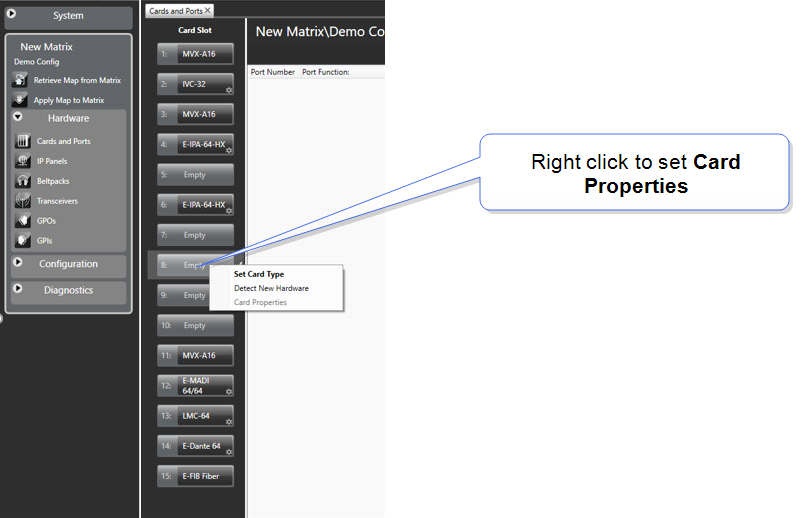
In the EHX configuration software, navigate to: Matrix > Hardware > Cards and Ports.
-
Right click on the card you wish to configure and select Card Properties.
-
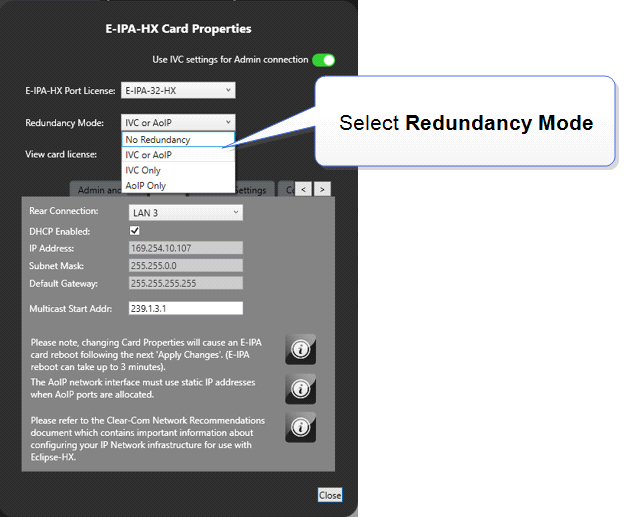
The Card Properties tab appears. Using the dropdown selector, select the required Redundancy Mode.
-
Apply Map to Matrix.
| Note: | If the redundant card has not been configured, the Redundancy Mode setting will be unavailable. |