Upgrade the IP Transceiver
-
Right-click on the Frame in the Layout window, and then select Firmware > Update Firmware. The Update Firmware Wizard appears.
-
Select Next. The following screen appears:
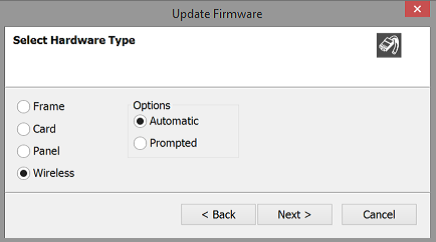
Note: For IP Transceivers, the Auto/Promoted radio button is always set to Auto.
-
Select the Wireless radio button.
-
Select Next, and then browse to the upgrade file (.fww) and select Open. The upgrade file is loaded to the transceiver, and the transceiver restarts.
You can track the status of the download in the EHX Event Log.
You can also upgrade the IP Transceiver using a USB memory stick. For more information, see the FreeSpeak II Integra User Guide.