Front Panel Connectors, Controls and Indicators
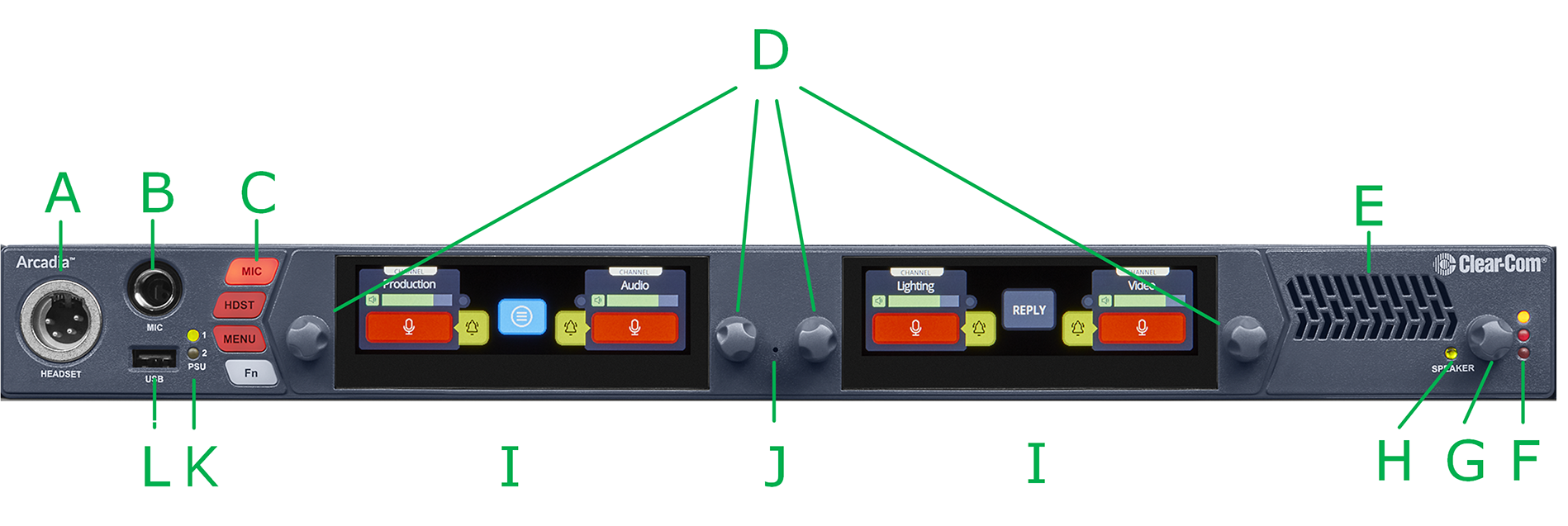
The Arcadia front panel connectors, controls and indicators are listed below.
| Item | Description |
|---|---|
| A | Headset connector (4-pin or 5-pin XLR). |
| B | Gooseneck mic socket (1/4-inch jack) |
| C |
Mic: Toggles microphone audio on and off to the keysets on the unit (similar to the Talk button). The Mic button overrides the effect of a latched talk on a keyset. HDST: When a headset is connected, this button switches audio between the headset microphone and the gooseneck microphone. Menu: Press to enter menu mode. Press again to exit, or allow menu mode to time out. Fn: Function button. For future use. |
| D | Rotary Encoders. Use these to control channel volume or to navigate through the menu system. |
| E | Loudspeaker |
| F |
Main Volume Level LEDs:
|
| G | Main Volume Control. This controls the listen levels for both the speaker and the headset. Pressing this control will mute/unmute the speaker audio output. |
| H | Speaker active LED: lights green when the speaker is active. Arcadia Station channel audio is heard here. The speaker is automatically active when there is no headset plugged into the Arcadia Station. |
| I |
Color touchscreen displays |
| J | Pin reset. Pin reset causes the device to power cycle (reboot) |
| K | Power input status indicators |
| L |
USB A connector. Use to:
|