Connecting User Stations via Digital Powerline Device
HXII-DPL Powerline device connects to your Arcadia via network and must be powered using the supplied power supply (PSU-EXT-005). Multiple HXII-DPL Powerline devices (24 max) can be added to a system either at a central location, or, for best performance, locally where connections to HelixNet user stations are needed.
| Note: | HelixNet user stations must run HelixNet firmware v.4.5 (included with Arcadia 2.11+) before use with the HXII-DPL Powerline device. |
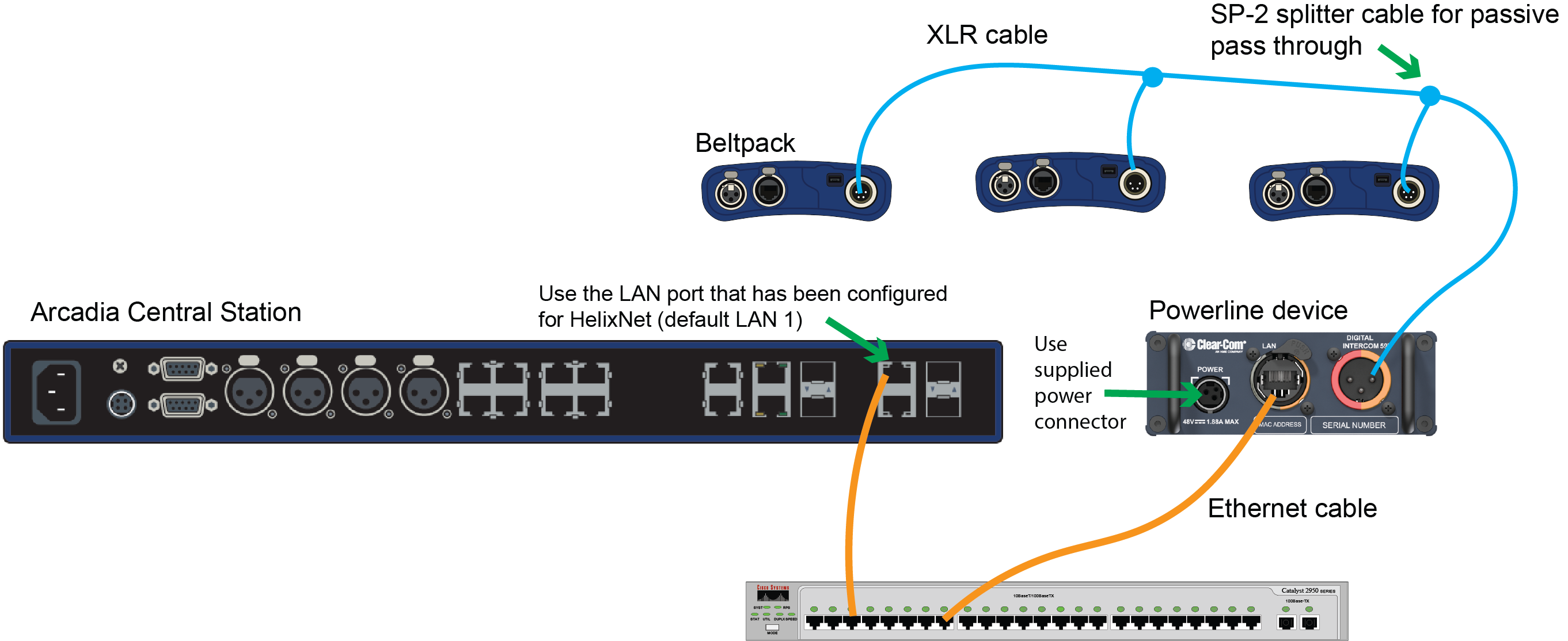
Connect the HXII-DPL Powerline device to HelixNet user stations using 3-pin XLR cabling, via passive splits or daisy chaining as appropriate.
Once physically connected and powered, the HelixNet user stations can be paired to the system.
HXII-DPL Powerline device does not need to be paired to the system. It is not visible in the CCM (Status > Overview > Wired) on first connection until a HelixNet endpoint is paired and connected via the device.