Setting Up the Wireless Beltpack System
Select the Wireless tab.
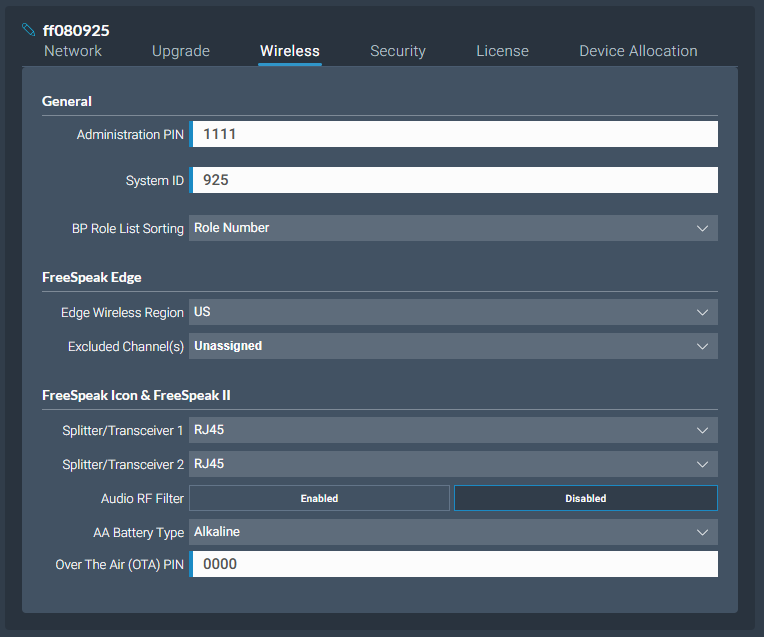
From the Wireless tab, you can set or view the following System and Station settings.
System
- The administration pin for local admin to access locked configuration menus on wireless beltpacks and keypanels
- System ID. This is used to differentiate this system's RF signals from those of other systems
- Beltpack role list sorting:
- Role number
- Alphabetical
FreeSpeak Edge
- The wireless region for your FreeSpeak Edge beltpacks. The region set here MUST match the hard-coded setting on your Edge transceiver or the system will not work. You will see an error flag in the Status page if the regions do not match. Please contact your Clear-Com representative if you have any difficulties with this.
- Select from a list of 5 GHz channels that you can exclude and prevent transceivers from using
- Scan all transceivers. Use this feature to scan the local 5 GHz RF space. All available channels will be scanned, and traffic reported. Each transceiver will be scanned and the system will report on the RF performance of selected channels. To view results of the scan and adjust channels, navigate to: Hardware > Resources > Transceivers > [select a transceiver to view] > Wireless Channels
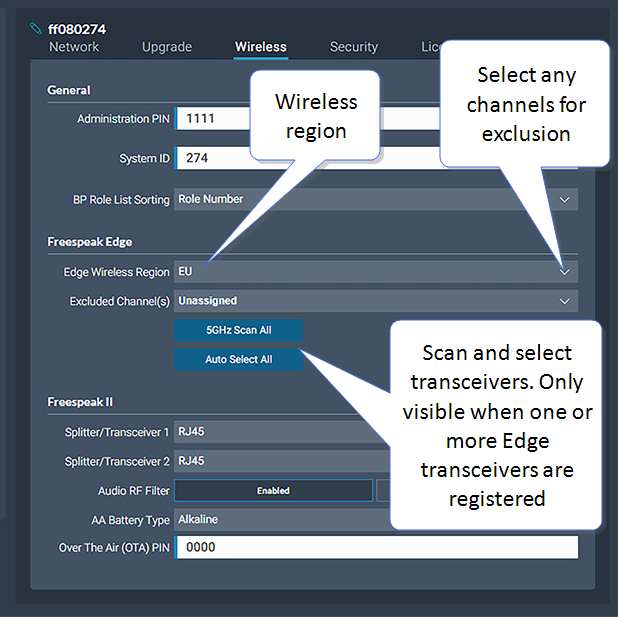
FreeSpeak II and FreeSpeak Icon
Splitter/Transceiver ports: select RJ45 or Fiber connectivity for each port
Audio RF Filter (improve resilience to corrupt wireless transmission) - for use with E1 1.9GHz transceivers only
AA Battery type. You can choose not to use the Li-ion batteries supplied with the beltpacks, in which case you must specify battery type here. Choose between:
Alkaline (AA) batteries (default setting)
NiMH batteries for use in settings where air pressure is an issue (for instance on an underwater site).
The OTA pin you need for over-the-air (OTA) registration of your FreeSpeak II and FreeSpeak Icon beltpacks.