Setting up GPIOs and Control Logic Events
Each GPI/GPO hosts up to 10 different events or actions. These actions can be overridden for testing or to bypass the logic in the Status > Logic page of the CCM
Control Logic Events allow crosspoint conditional activation of crosspoints, GPO, and Call signals
2 x DB 9F connectors on the rear of the Arcadia
For DB 9F pinouts, see Appendix A: Pinouts
On an input from an external device, an audio route can be established.
If an on-air light comes on, the program feed (PGM) can be routed to a Channel or beltpack
Use a footswitch to allow the station user to open an audio route to a Channel
On an input from a two-way radio, an audio route can be established to a channel (the radio talks to the channel)
Initiate a Call signal.
GPOs are triggered when Talk, Talk & Listen user station buttons are pressed or a Call signal is active.
When someone talks to stage announce, an output relay (GPO) is sent to the external stage announce speaker
When someone talks to a channel labeled Radio, an output is sent to a 2-way radio
When a call signal (Call) comes into a channel, and output is sent to turn on an on-air light
When a crosspoint is active then another crosspoint can be activated as well for the same duration
When a crosspoint is active then a call signal can be activated as well for the same duration
When a crosspoint is active then a GPO can be activated as well for the same duration
This example opens a talk route from the Arcadia to a Channel when an input occurs on GPI1 (for instance, from a footswitch).
Navigate to Configuration > Logic.
On the left panel, click GPI1 to select it.
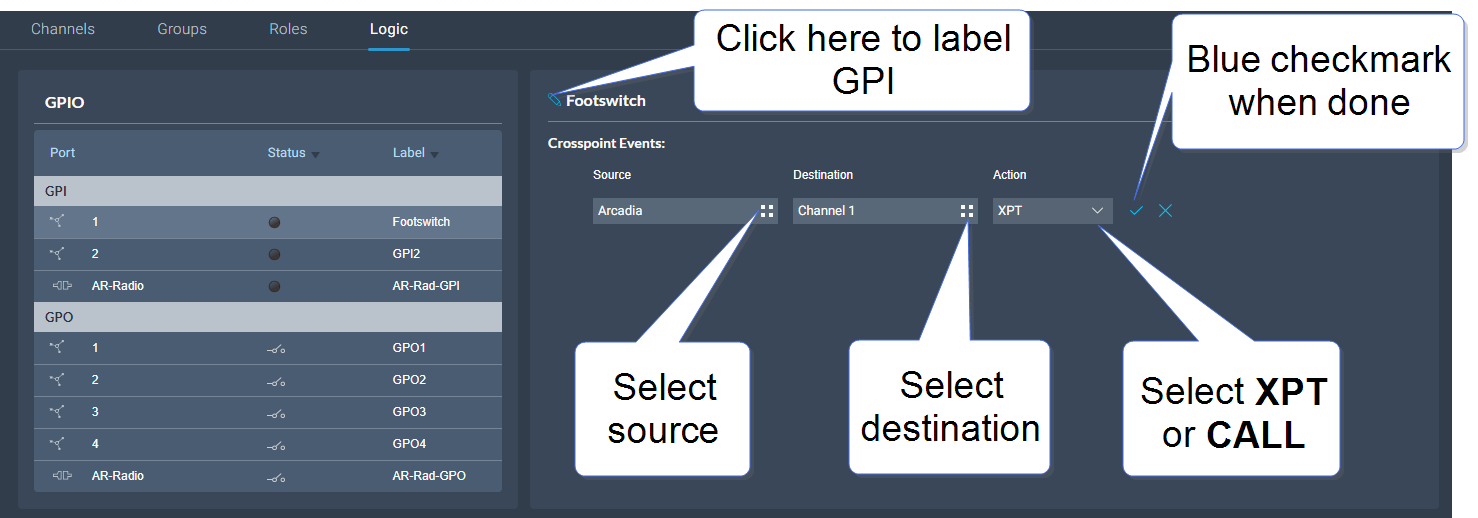
Click the Add button  in the center panel.
Click the Options button  to select a Source. Select Arcadia
Click the Options button to select a Destination. Select the required Channel.
Select Action (crosspoint or call signal). In this case choose crosspoint (XPT).
Click the blue check mark.
To label the GPI, click the pencil icon.
To test the GPI, or turn it on and off, navigate to Status > Logic. See:
Logic .
In this example you send an output trigger (for example to an external stage announce speaker) on GPO1 when a beltpack Talk is activated on the stage announce (SA) 4-wire port.
Navigate to Configuration > Logic.
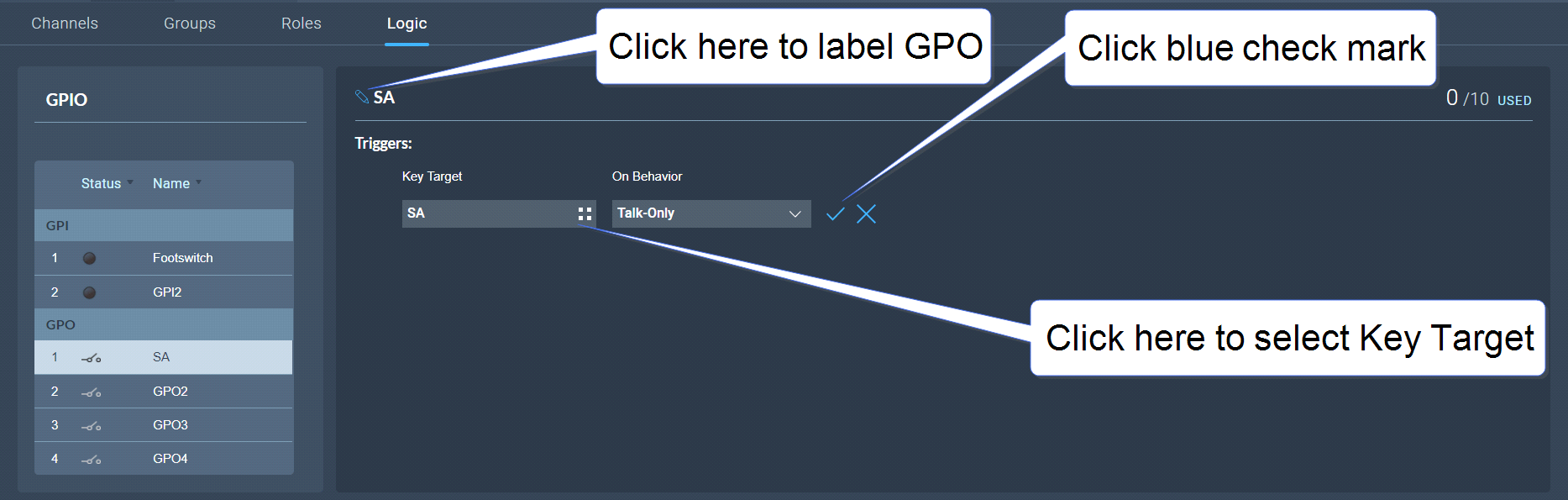
On the left panel, click GPO1 to select it.
Click the Add button in the center panel.
Click the Options button to select a Key Target. Select stage announce (SA).
In this case, the On Behavior field defaults to Talk Only.
Click the blue check mark.
To label the GPO, click the pencil icon.
To test the GPO, navigate to Status > Logic. See Logic .
| Note: | GPO Talk & Listen behavior is only for use with FreeSpeak and V-Series (Talk & Listen or Dual Talk & Listen) key activations on a single button. Talk-Only is for use with Arcadia, FreeSpeak and HelixNet keys using all other types of Talk activations. |
 Examples of GPI actions